Getting started
CAN Bus Demo with ESP32, LVGL, and DBC Code Generation
A demonstration project showcasing CAN bus communication between two ESP32 boards with LVGL GUI, DBC-based code generation, and a modular firmware architecture. This project is ideal for learning CAN protocols, embedded UI development, and code generation workflows.
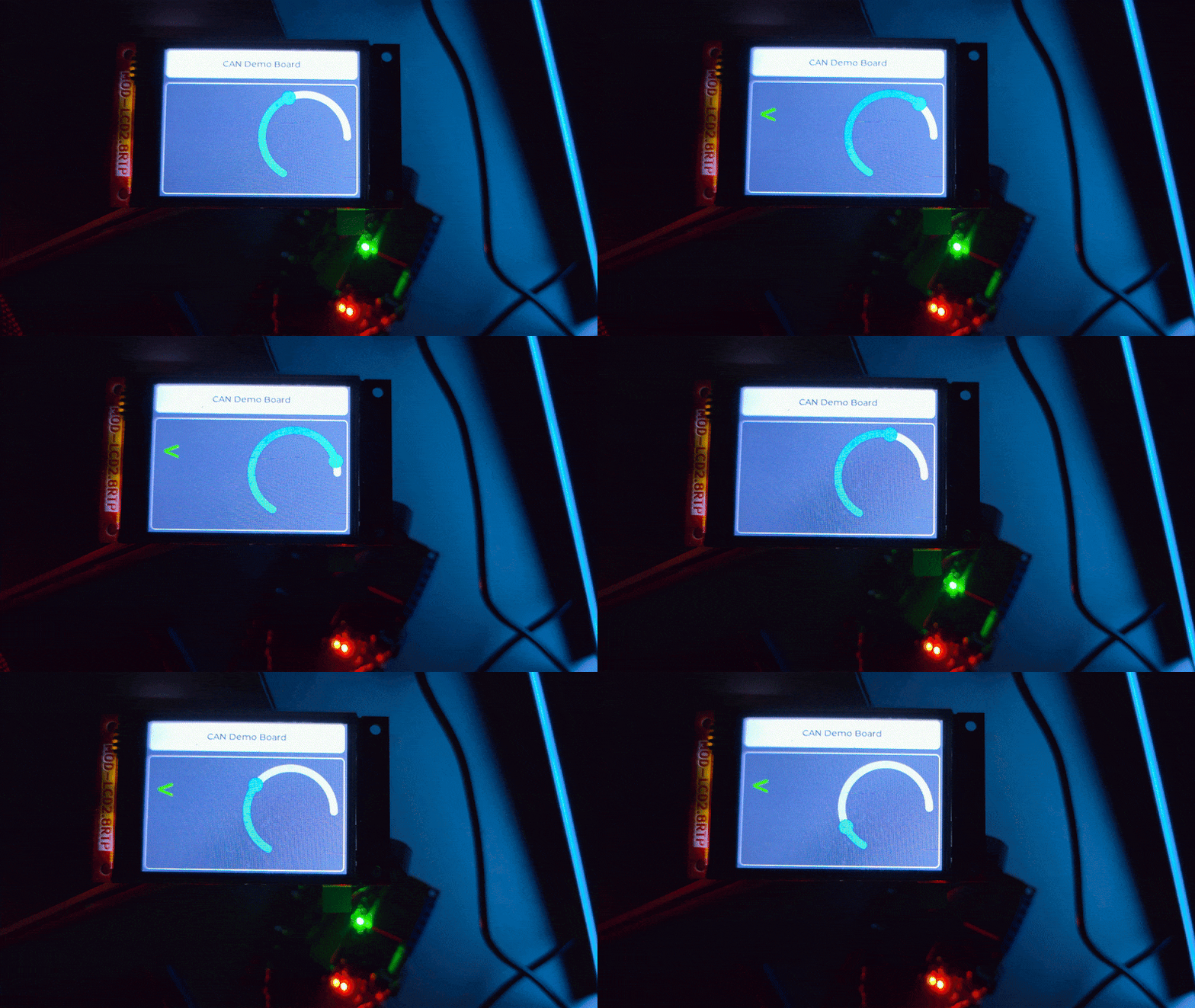
🎯 What This Project Demonstrates
CAN Bus Communication
Dual ESP32 setup: one TX board (transmitter) and one RX board (receiver)
500 kbps CAN communication using ESP32’s built-in CAN controller
Message filtering, unpacking, and event-driven processing
DBC-Driven Code Generation
Define CAN messages in a standard
.dbcfileAuto-generate C code for encoding/decoding using
c-coderdbcType-safe message handling with generated structs
LVGL Graphical UI (RX Board)
Real-time display of CAN data on TFT touchscreen
SquareLine Studio integration for UI design
Arc gauge for speed, turn signal indicators
Modular Firmware Architecture
Event-driven state machine with message routing
Pub/sub pattern for decoupled components
Health monitoring with automatic degradation and recovery
🚀 Quick Start
Prerequisites
Hardware
2x ESP32 boards (e.g., ESP32-EVB or similar)
CAN transceivers (e.g., SN65HVD230 or MCP2551)
TFT display with touch (for RX board)
CAN bus wiring (120Ω termination resistors recommended)
Software
PlatformIO (VS Code extension or CLI)
Python 3.x (for optional documentation builds)
Git (to clone this repository)
Installation
Clone the repository
git clone --recursive https://github.com/rvxfahim/CAN-Demo-ESP32.git
cd CAN-Demo-ESP32
Configure serial ports (if different from defaults)
Editplatformio.iniand set your COM ports:[env:rx_board] upload_port = COM8 ; Change to your RX board port monitor_port = COM8 [env:tx_board] upload_port = COM9 ; Change to your TX board port monitor_port = COM9
Build and upload
RX Board (receiver with display):
pio run -e rx_board -t upload
pio device monitor -e rx_board
TX Board (transmitter):
pio run -e tx_board -t upload
pio device monitor -e tx_board
Connect the hardware
Wire CAN_H and CAN_L between boards through transceivers
Connect 120Ω termination resistors at both ends
Power both boards
TX will start sending
Clusterframes; RX display will update
📖 Understanding the DBC Workflow
What is a DBC File?
A DBC (CAN Database) file is an industry-standard format for defining CAN messages, signals, and their properties. It serves as the single source of truth for all CAN communication in this project.
Location: tools/Lecture.dbc
Code Generation Process
This project uses c-coderdbc to auto-generate C encode/decode functions from the DBC file.
Step 1: Edit the DBC File
The example Lecture.dbc defines a Cluster message (ID 0x65) with signals:
Speed(12-bit): 0–4095 rangeLeft_Turn_Signal(1-bit): booleanRight_Turn_Signal(1-bit): boolean
You can edit this file with any text editor or use tools like CANdb++ Editor or SavvyCAN.
Step 2: Run the Code Generator
Linux/macOS: Use the provided helper scripts to build the tool and generate the code:
# First, build the coderdbc tool (only needed once)
./tools/build_coderdbc.sh

# Then, generate the C code from Lecture.dbc
./tools/generate_code.sh
Windows:
cd tools\c-coderdbc
# Compile the tool first using CMake (or use a pre-compiled binary)
# Then run the generator:
.\build\coderdbc.exe -dbc ..\Lecture.dbc -out ..\..\lib\Generated -drvname lecture -rw -nodeutils
This regenerates:
lib/Generated/lib/lecture.candlecture.h(generated code, do not edit)Helper files in
lib/Generated/conf/,lib/Generated/inc/, etc.
Step 3: Use Generated Types in Code
The firmware uses the generated types exclusively:
#include "lecture.h"  // Generated header

// Packing (TX side)
Cluster_t cluster = {0};
cluster.Speed = 2048;
cluster.Left_Turn_Signal = 1;
cluster.Right_Turn_Signal = 0;

uint8_t data[8];
Pack_Cluster_lecture(&cluster, data, 8);
CAN0.sendFrame({ .identifier = 0x65, .data = data, ... });

// Unpacking (RX side)
Cluster_t received;
Unpack_Cluster_lecture(&received, frame.data, frame.data_length_code);
Key principle: Never manually parse CAN bytes. Always use Pack_* and Unpack_* functions.
🏗️ Project Structure
CAN-Demo-ESP32/
├── platformio.ini           # Build config (two environments: rx_board, tx_board)
├── tools/
│   ├── Lecture.dbc          # CAN message definitions (source of truth)
│   └── c-coderdbc/          # DBC-to-C code generator
├── lib/
│   ├── Generated/           # Auto-generated C code (from DBC)
│   ├── CanDriver/           # ESP32 CAN driver abstraction
│   ├── Ui/                  # LVGL UI (SquareLine Studio exports)
│   └── TouchLibrary/        # Touch controller drivers
├── src/
│   ├── common/              # Shared code (MessageRouter, etc.)
│   ├── rx/                  # RX board firmware (main + modules)
│   ├── tx/                  # TX board firmware (main only)
│   └── generated_lecture_dbc.c  # Single include wrapper for DBC code
├── include/                 # Global headers (IOPins, TFT config)
├── docs/                    # Sphinx documentation source
└── README.md                # This file
📚 Documentation
For detailed architecture, sequence diagrams, and API references, see the full documentation:
🌐 GitHub Pages Documentation
Topics covered:
Getting Started: Detailed setup and hardware connections
Architecture: Component diagrams, state machines, data flow
CAN & DBC: In-depth DBC workflow and regeneration steps
Testing: Unit test guidelines and test hooks
API Reference: Doxygen-generated class/function documentation
🔧 Configuration and Customization
CAN Parameters
Bitrate: 500 kbps (configurable in
CanInterface.cpp)Pins: GPIO 35 (RX), GPIO 5 (TX) — change in
CanInterface::Initialize()Message ID:
0x65forCluster(defined in DBC)
Display and UI
Screen: Configured in
include/TFTConfiguration.handlib/Ui/TFT_eSPI Setup: Edit
include/tft_setup.h(project-owned persistent config). Do not edit.pio/libdeps/.../TFT_eSPI/User_Setup*.hbecause PlatformIO reinstalls those files.UI Design: Edit with SquareLine Studio, export to
lib/Ui/Widgets: Arc gauge (
ui_Arc1), labels (ui_RightLabel,ui_LeftLabel)
IO Relays (Blinkers)
Pins: GPIO 25 (left), GPIO 26 (right) — see
include/IOPins.hBlink Rate: 1 Hz (500ms ON/OFF) — adjust in
IOModule::Update()
Health Monitoring
Timeout: 1500ms (RX declares
Degradedif no CAN frames) — seeHealthMonitor.cpp
🧪 Testing and Troubleshooting
Common Issues
RX display doesn’t update:
Verify TX is sending frames (check TX serial monitor)
Check CAN wiring and termination resistors
Ensure both boards have matching bitrate (500 kbps)
Blinkers don’t work:
Confirm relay pins in
include/IOPins.hmatch your hardwareVerify
Left_Turn_Signal/Right_Turn_Signalbits are set in TX
System shows “Degraded”:
Normal behavior when CAN frames stop arriving (timeout threshold)
Should auto-recover when TX resumes
Build Errors
Missing LVGL or TFT_eSPI:
PlatformIO will auto-install dependencies from lib_deps in platformio.ini.
Linker errors about Cluster_t:
Ensure src/generated_lecture_dbc.c is included in the build (check build_src_filter).
🤝 Contributing
Contributions welcome! Please:
Fork the repository
Create a feature branch (
git checkout -b feature/amazing-feature)Commit changes (
git commit -m 'Add amazing feature')Push to branch (
git push origin feature/amazing-feature)Open a Pull Request
📄 License
This project is licensed under the GPLV3 License. See LICENSE file for details.
🔗 Key Technologies
PlatformIO — Cross-platform embedded build system
LVGL v9.1 — Lightweight graphics library
TFT_eSPI — Fast TFT display driver
SquareLine Studio — Drag-and-drop LVGL UI designer
c-coderdbc — DBC-to-C code generator
ESP32 Arduino — Arduino framework for ESP32
📞 Questions or Support
Documentation: https://rvxfahim.github.io/CAN-Demo-ESP32/
Issues: GitHub Issues
Repository: github.com/rvxfahim/CAN-Demo-ESP32