Building a Linux IIO Driver with Yocto: From Kernel Module to Bootable Image
When I first started learning Yocto, I hit a wall. Most tutorials either skim the surface (“just run bitbake core-image-minimal”) or focus on application-layer recipes while completely skipping kernel development. And the ones that do cover kernel modules almost always assume you have a physical board sitting on your desk.
I wanted something different: a complete, self-contained project that walks through the entire Yocto pipeline — from writing a kernel module, to packaging it with BitBake, to booting the result in QEMU and reading live sensor data. No hardware required.
That’s exactly what this project delivers.
The Project at a Glance
The yocto_driver_sample repository is a custom Yocto Kirkstone BSP layer (meta-yocto_driver_sample) containing:
- A kernel module (
mock-adxl345) — a simulated 3-axis accelerometer driver built on the Linux IIO (Industrial I/O) subsystem - A device tree overlay that instantiates the driver on any platform
- A user-space reader application that polls sysfs and displays formatted acceleration data
- A systemd service to auto-start the reader at boot
- A custom image recipe that bundles everything into a bootable QEMU image
- Six PlantUML architecture diagrams documenting the full system
The Kernel Module: mock-adxl345
The heart of the project is mock_adxl345.c, an IIO platform driver that generates time-varying acceleration data with no hardware dependency.
IIO Platform Driver with devm_* Management
The driver uses the platform_driver framework and the Linux managed-resource (devm_*) API. In the probe() function, a single call to devm_iio_device_alloc() allocates the IIO device and its private data, and devm_iio_device_register() handles registration. If the driver is removed — or if anything fails during probe — the kernel automatically tears everything down. No manual error paths, no forgotten cleanup.
Integer-Only Parabolic Sine Approximation
Generating smooth acceleration data without floating-point or libm was a fun constraint. The sine_milli() function implements a parabolic approximation of the sine wave using only integer arithmetic:
sin(x) ~= 4 * x * (PI - x) / PI^2Mapped to degrees and scaled by 1000, this produces a smooth waveform in the range [-1000, 1000] mg. The X channel oscillates with a 60-second period, Y channel is phase-shifted by 90 degrees (cosine), and Z hovers around 980 mg (~1g) with a small wobble.
Dual Instantiation: DT and Non-DT Systems
One design decision I’m particularly happy with: the driver checks of_have_populated_dt() at init. On device-tree systems (ARM64 single-board computers), the platform device is created by applying the device tree overlay. On non-DT systems (x86 QEMU), the driver falls back to calling platform_device_register_simple() directly, so it works everywhere without modification.
This means you can test the exact same code in QEMU on your laptop that would run on an i.MX8M Mini EVK in production.
The Yocto Layer
Recipe Structure
The layer follows Yocto best practices with three recipes:
-
mock-adxl345_1.0.bb— Kernel module recipe inheritingmodule.bbclass. It setsDEPENDS += "virtual/kernel dtc-native"so BitBake builds the kernel headers first and provides the device tree compiler. The module is loaded at boot viaKERNEL_MODULE_AUTOLOAD += "mock-adxl345". Ado_compile:append()compiles the.dtsoverlay usingdtc, anddo_install:append()places the.dtbointo/boot/overlays/. -
mock-adxl345-app.bb— User-space application recipe that inheritssystemd.bbclass. The critical detail here isRDEPENDS:${PN} += "mock-adxl345"(notDEPENDS) — the app needs the kernel module at runtime, not at build time. This is a classic Yocto gotcha that the recipe dependency graph diagram explains visually. -
yocto-driver-sample-image.bb— A thin image recipe that inheritscore-imageand explicitly listsmock-adxl345andmock-adxl345-appin itsIMAGE_INSTALL.
Kernel Config via bbappend
The kernel configuration is handled through linux-yocto_%.bbappend, which appends an iio.cfg fragment to the kernel source URI. This enables CONFIG_IIO, CONFIG_IIO_BUFFER, CONFIG_IIO_KFIFO_BUF, and CONFIG_IIO_TRIGGER — everything needed for the IIO subsystem. The % wildcard in the bbappend filename means it applies to any kernel version, making the layer portable.
The Device Tree Overlay
The overlay (mock-adxl345.dts) is deliberately minimal — a single fragment targeting the root node with a compatible = "yocto_driver_sample,mock-adxl345" string. This simplicity is intentional: it shows the pattern without overwhelming newcomers.
Architecture Diagrams
The docs/diagrams/ directory in the repo contains six PlantUML architecture diagrams with a suggested reading order that takes you from the big picture to the details. Each has both .puml source and rendered .svg.
1. Overall Architecture
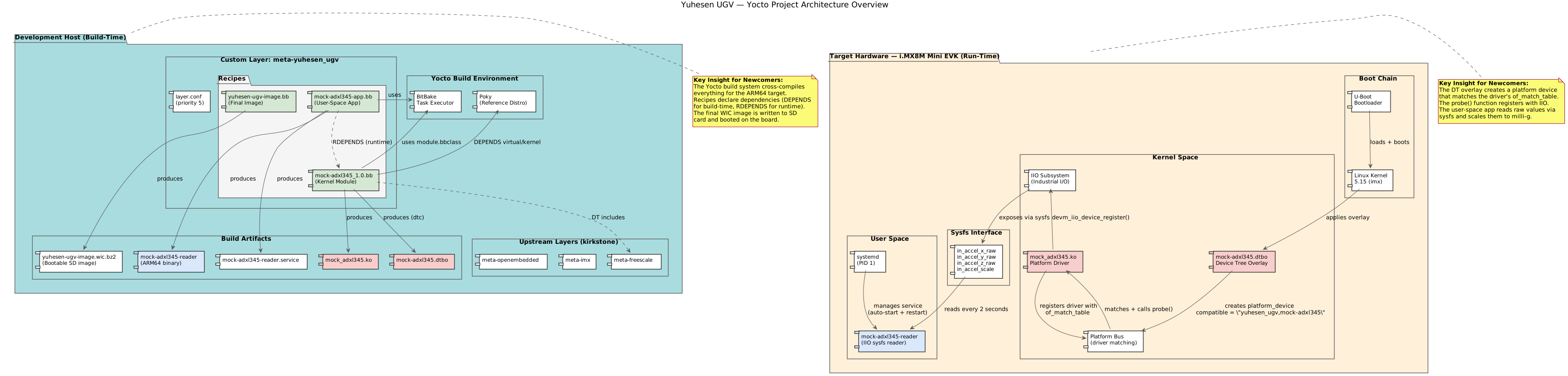 The two-zone view: development host (build-time) and target board (run-time), showing what lives where.
2. Deployment Diagram
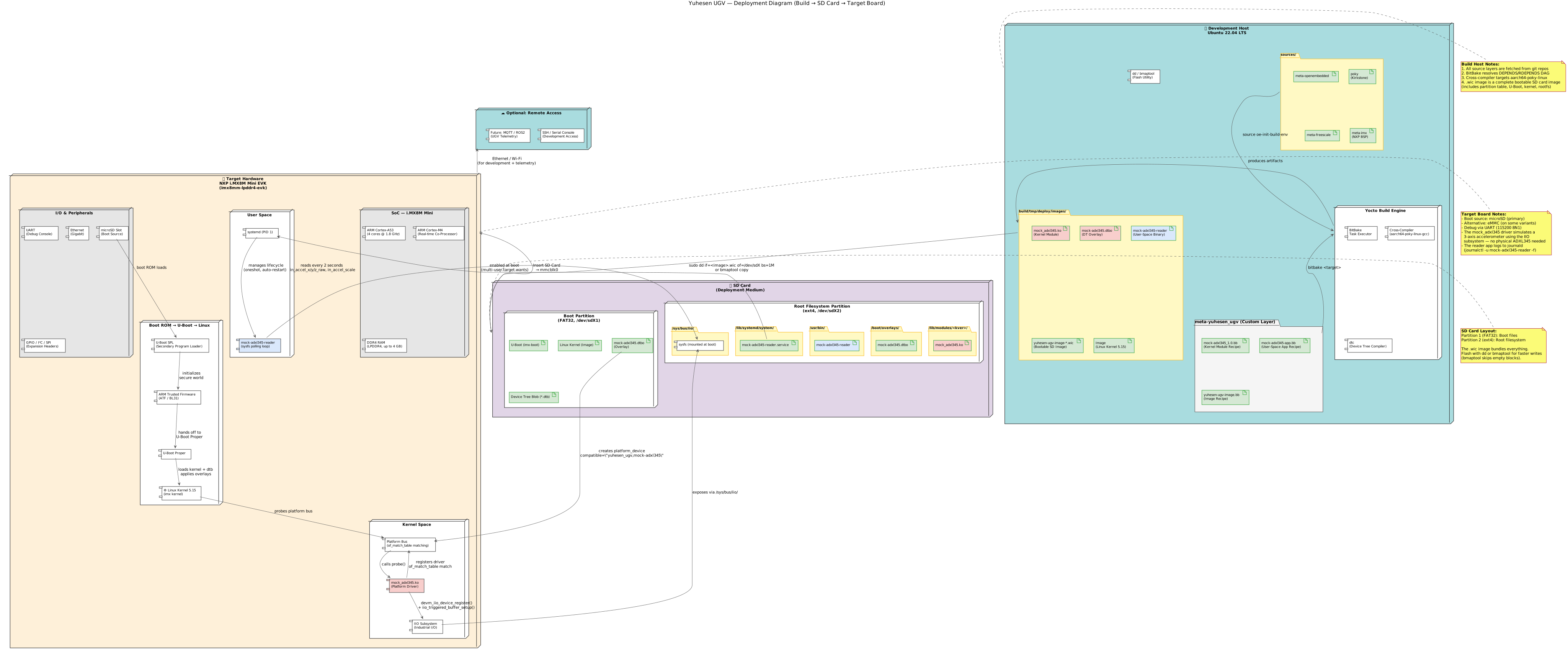 SD card layout, boot chain (U-Boot → Kernel), artifact placement, and the NXP i.MX8M Mini EVK target hardware.
3. Recipe Dependency Graph
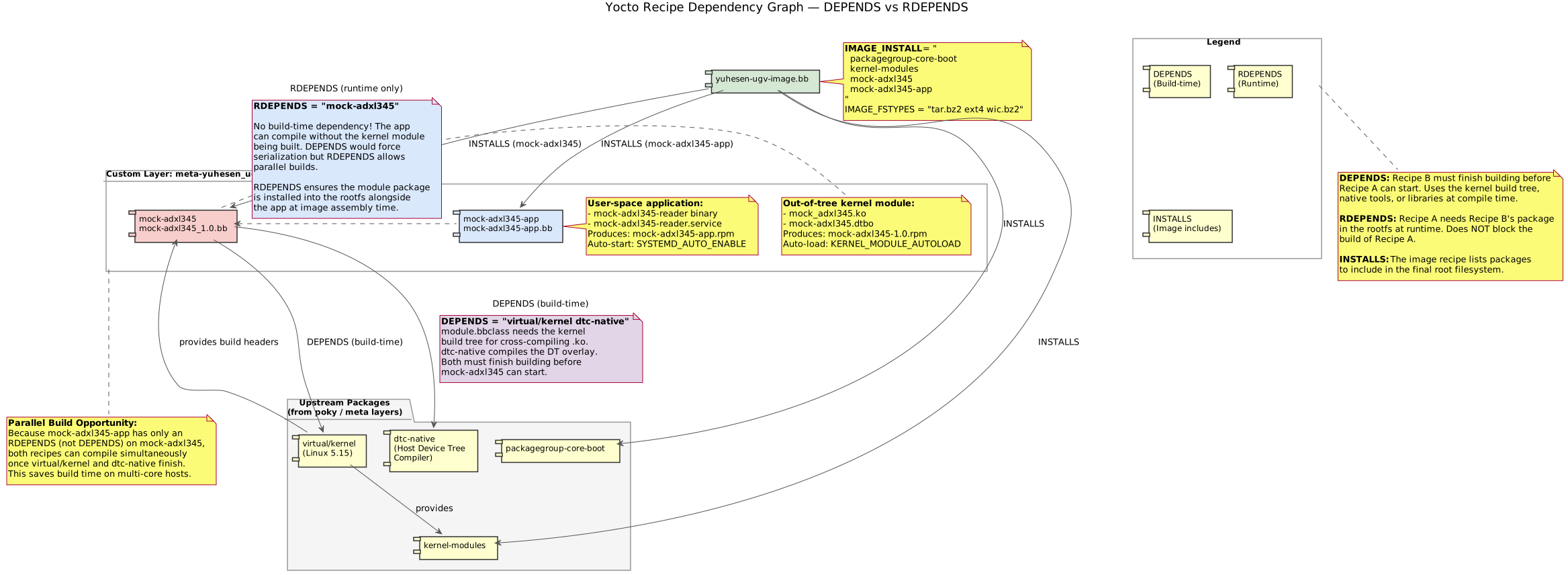 The distinction between
 DEPENDS (build-time) and RDEPENDS (run-time) made concrete, including why it enables parallel builds.
4. Build Flow Sequence
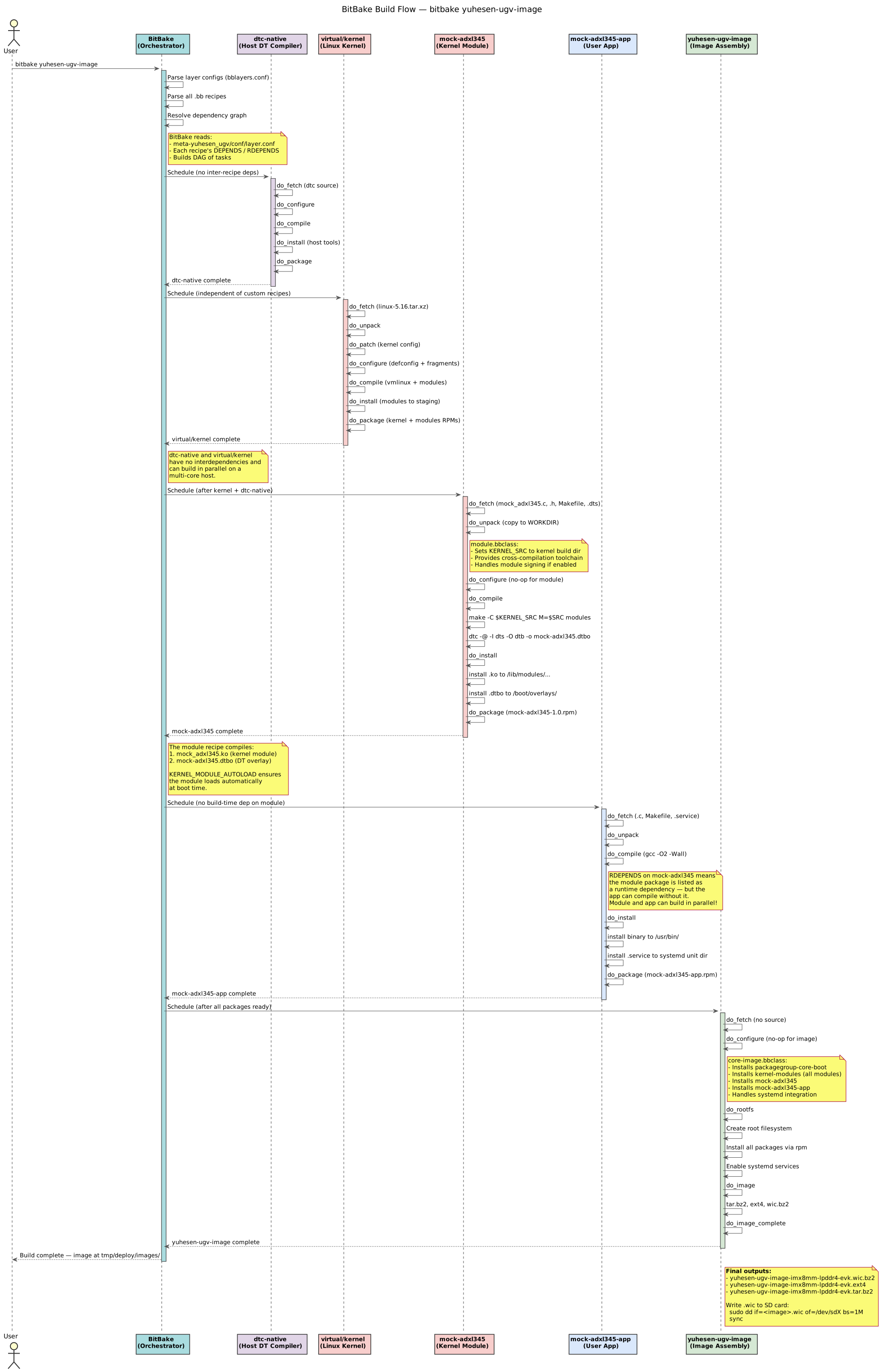 What happens when you run
 bitbake: parsing, dependency resolution, parallel compilation, packaging, and final image assembly.
5. Device Tree + Driver Binding
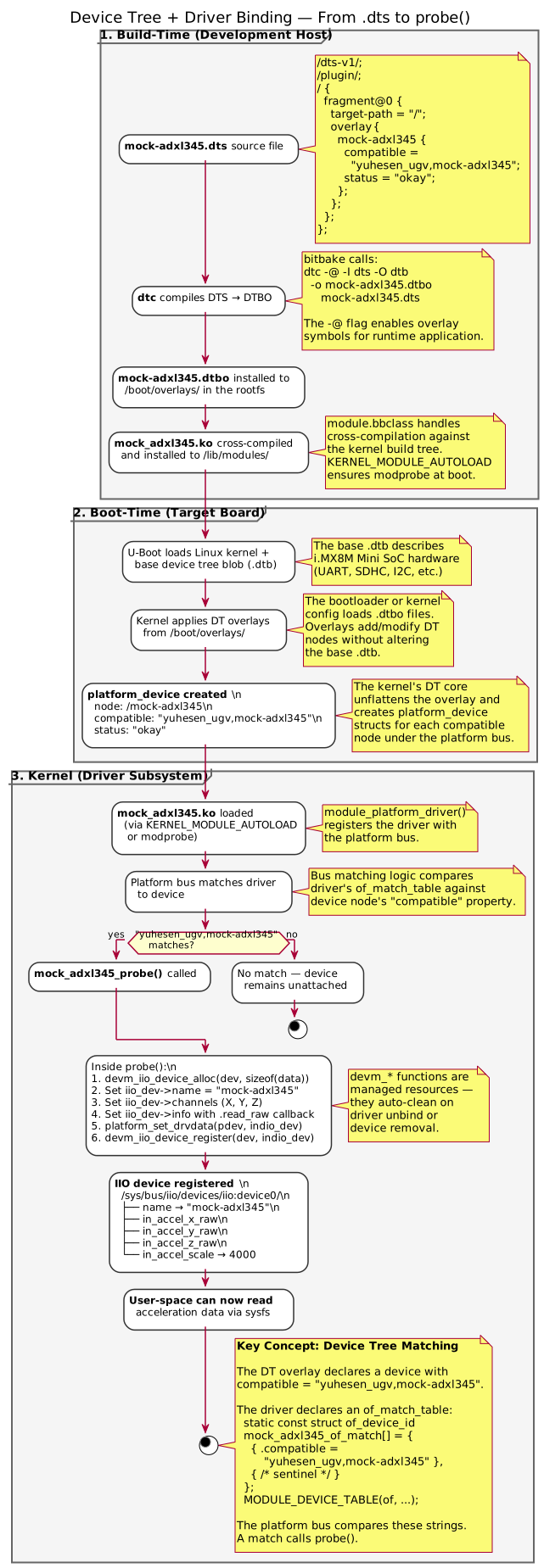 How a
How a .dts file becomes a kernel driver: dtc compilation, U-Boot loading, kernel overlay application, and platform device binding.
6. Runtime Data Flow
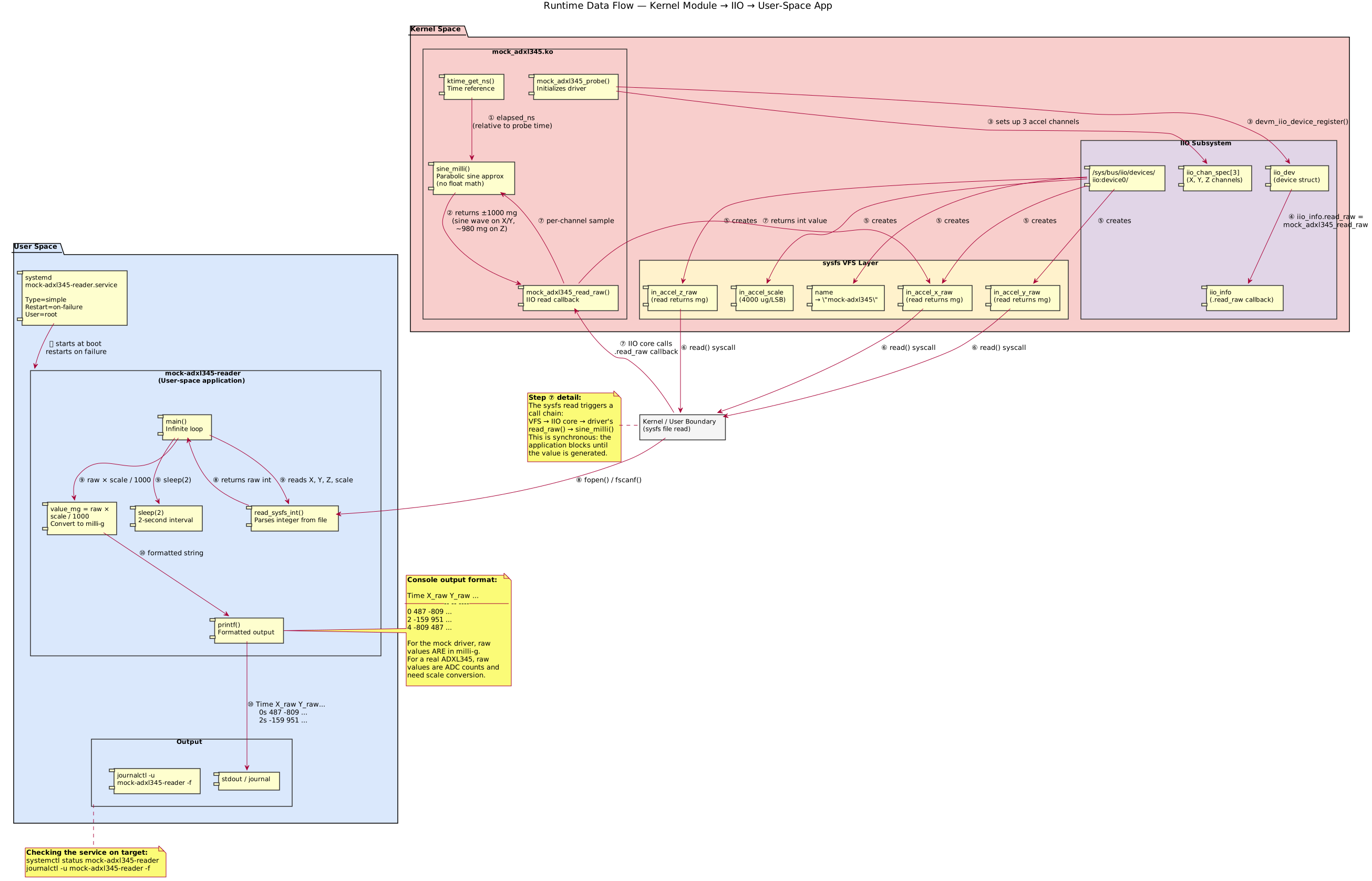 Following a single IIO sample value from the kernel timer through
 sine_milli(), the IIO subsystem, sysfs, and into the user-space reader.
What I Learned
Building this end-to-end taught me more than any tutorial could:
- The Yocto build pipeline — from
oe-init-build-envthrough parsing recipes, fetching sources, cross-compiling, packaging, and assembling the final image. Watchingbitbake core-image-minimalproduce a bootable QEMU image with your own driver inside is deeply satisfying. - DEPENDS vs RDEPENDS — A distinction that sounds academic until you get it wrong and your application builds fine but crashes at boot because the kernel module isn’t there. Now it’s muscle memory.
- BSP layer structure — How
layer.confdeclares priorities and compatibilities, how%bbappends wildcard across kernel versions, and howFILESEXTRAPATHSextends the recipe search path. - Platform driver philosophy — The
of_match_table/compatiblestring matching dance is elegant once you see it in action. The dual DT/non-DT pattern is something I now use in every platform driver I write.
The repo is fully open source — clone it, follow the quick start, and you’ll have a bootable QEMU image with your own IIO driver in under an hour (after the first build, anyway).